Choosing a tablet in the Rs 45,000–Rs 60,000 price range can be confusing. Some tablets are designed mainly for entertainment, while others offer features for studying, drawing, document editing and office work. A few even try to replace a basic laptop.
The HP OmniPad 12 and Samsung Galaxy Tab S10 FE are two options worth comparing if you want a large Android tablet for everyday use. However, their priorities are different.
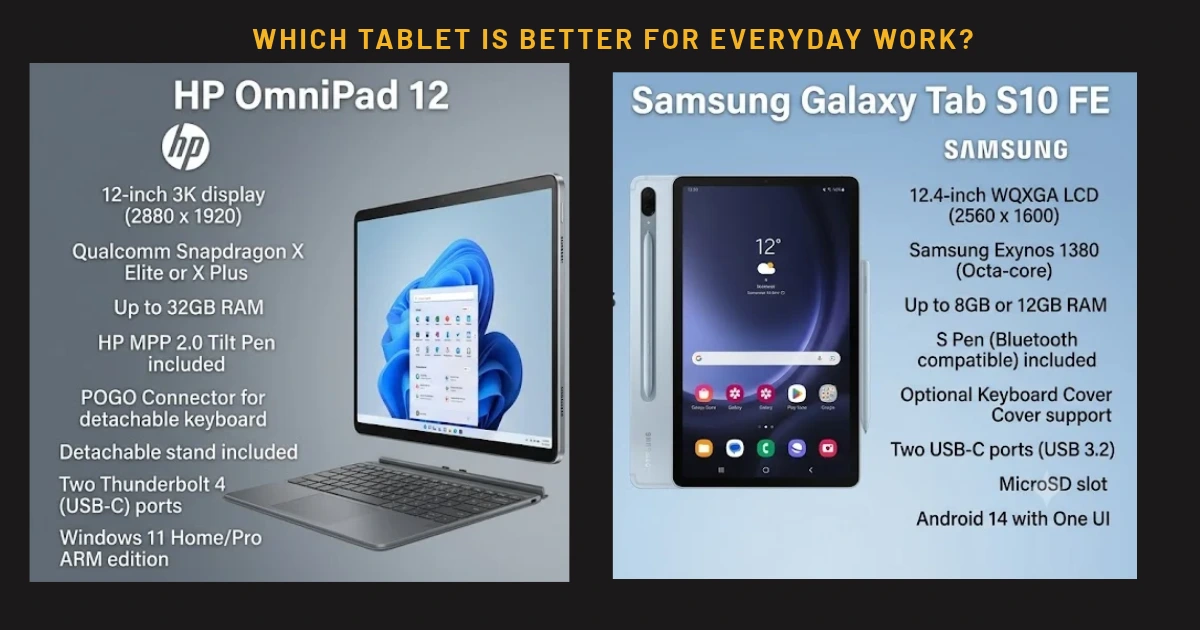
HP positions the OmniPad 12 as a tablet with a detachable keyboard and a laptop-like working experience. Samsung's Galaxy Tab S10 FE combines a 10.9-inch display with S Pen support, expandable storage and options for Wi-Fi or 5G connectivity.
The decision is not simply about which device has the bigger screen. You should also consider whether you prefer typing with a keyboard or writing with a stylus, whether mobile connectivity matters, how much storage you need and which software features you use most often.
In this HP OmniPad 12 vs Samsung Galaxy Tab S10 FE comparison, we look at their prices, specifications, productivity features, portability, battery claims and value for money to help you choose the right tablet.
HP OmniPad 12 vs Samsung Galaxy Tab S10 FE: Price in India
Prices vary according to configuration, seller, colour, promotional offers and availability. The following figures are based on the manufacturers' Indian online listings checked for this comparison.
HP OmniPad 12
-
8GB RAM + 128GB storage: Rs 48,999
-
8GB RAM + 256GB storage: Rs 54,999
Samsung Galaxy Tab S10 FE
-
Wi-Fi, 8GB RAM + 128GB storage: Samsung's listed promotional price has been around Rs 47,999 on one official listing.
-
Wi-Fi, 12GB RAM + 256GB storage: Listed around Rs 59,999 on an official Samsung store page.
-
5G, 8GB RAM + 128GB storage: Listed around Rs 56,999 on an official Samsung store page.
These are displayed online prices, not guaranteed prices for every buyer or seller. Offers may change, and some configurations can be temporarily unavailable.
The HP OmniPad 12 has a straightforward proposition: its detachable keyboard is central to its laptop-like experience. With Samsung, the included S Pen is a major advantage, but buyers who want a keyboard cover should check its price separately. Do not assume the keyboard is included in the tablet's listed price.
If your budget is close to Rs 50,000, compare the final checkout price of the exact configurations rather than comparing one tablet's discounted price with another's original MRP.
Specifications compared
The following table summarises the main differences.
| Feature |
HP OmniPad 12 |
Samsung Galaxy Tab S10 FE |
| Display |
12-inch 2K touchscreen |
10.9-inch WUXGA+ LCD |
| Resolution |
2000 x 1200 pixels |
2304 x 1440 pixels |
| Refresh rate |
Up to 90Hz |
Up to 90Hz |
| Processor |
Qualcomm Snapdragon SM6475Q platform |
Samsung Exynos 1580 |
| Memory |
8GB RAM |
8GB or 12GB, depending on configuration |
| Storage |
128GB or 256GB |
128GB or 256GB, depending on configuration |
| Expandable storage |
Check configuration and official specifications |
microSD support up to 2TB |
| Stylus |
Check accessory compatibility |
S Pen support; S Pen included |
| Keyboard |
Detachable keyboard package |
Compatible keyboard accessories sold separately in many bundles |
| Rear camera |
13MP |
13MP |
| Front camera |
8MP |
12MP |
| Battery |
HP advertises up to 18 hours under specified conditions |
8,000mAh; Samsung advertises up to 20 hours of wireless video playback |
| Connectivity |
Wi-Fi and Bluetooth; check exact configuration |
Wi-Fi or 5G versions, depending on model |
| Software |
Android |
Android with Samsung's One UI |
| Water and dust resistance |
Check exact official product specifications |
IP68-rated tablet and S Pen |
Specifications and accessory bundles should be verified against the exact model sold in India before buying. Battery-life figures from manufacturers use particular test conditions and are not directly comparable with everyday mixed-use results.
Display: HP offers more screen space
The HP OmniPad 12 has a 12-inch display with a resolution of 2000 x 1200 pixels. The larger panel is useful if you regularly read long documents, open spreadsheets, attend online classes or keep two supported applications visible together.
Samsung's Galaxy Tab S10 FE has a 10.9-inch LCD with a 2304 x 1440 resolution and a refresh rate of up to 90Hz. Its smaller size makes it easier to handle, while the higher pixel count gives it a sharper image on paper. Samsung also lists outdoor brightness features, including High Brightness Mode, for improved visibility in bright conditions.
Both displays support smooth scrolling at up to 90Hz. That is useful for reading websites, moving through documents and navigating applications.
The practical choice depends on your habits. If you mostly use your tablet at a desk or on a stand, the HP's larger display can be more comfortable. If you carry your tablet frequently, read while travelling or prefer a compact device, Samsung's smaller screen may be a better fit.
Neither screen should be judged by resolution alone. Brightness, reflections, colour reproduction, viewing distance and the applications you use all influence the experience.
Performance: Which tablet is better for everyday work?
The HP OmniPad 12 uses Qualcomm's Snapdragon SM6475Q platform and comes with 8GB of RAM. It is intended for everyday Android applications, web browsing, document work, online classes, streaming and general productivity.
The Samsung Galaxy Tab S10 FE uses Samsung's Exynos 1580 processor. Its 8GB or 12GB memory configurations provide options for buyers who want more RAM, particularly when choosing the 256GB version.
However, a higher memory figure does not automatically guarantee better performance in every application. Software optimisation, processor behaviour, storage speed and the workload all matter.
For routine tasks such as checking email, reading PDFs, attending meetings and browsing websites, both devices should be evaluated around the applications you actually use. For demanding games, intensive multitasking or creative applications, consult independent performance tests for the specific software you plan to run.
HP's emphasis is on a keyboard-based productivity experience. Samsung's tablet benefits from its wider Galaxy ecosystem and software features, including tools designed for stylus input and multitasking.
If you rely on desktop-only Windows software, advanced Excel macros or specialist business applications, neither Android tablet should automatically be treated as a complete laptop replacement. Check the compatibility of every essential application before spending your money.
Keyboard versus S Pen: The biggest difference
This is the most important part of the comparison.
The HP OmniPad 12 is built around a detachable keyboard and a laptop-like interface. It makes sense for people who type regularly and want to work on documents without buying a separate keyboard accessory.
The keyboard can help with assignments, emails, reports, basic spreadsheets and browser-based office tools. Its usefulness depends on the quality of the typing experience, trackpad behaviour and the stability of the setup. Buyers who write for several hours every day should try the keyboard if possible.
Samsung takes a different approach by including S Pen support and an S Pen in the box. That makes the Galaxy Tab S10 FE attractive to students who handwrite notes, annotate PDFs, draw diagrams or mark up documents.
A stylus can be quicker than typing when you are working through mathematical equations, sketching ideas or writing directly on lecture slides. It also gives the Samsung tablet a useful role as a digital notebook.
The S Pen does not automatically make Samsung better for typing, just as HP's keyboard does not automatically make it better for handwriting. These accessories serve different purposes.
Choose HP if you spend more time typing. Choose Samsung if handwriting, sketching and annotating are central to your routine. If you need both, calculate the total cost of the tablet and accessories before deciding.
Battery life and charging
HP advertises up to 18 hours of battery life under its specified test conditions. Samsung lists an 8,000mAh battery and advertises up to 20 hours of wireless video playback.
These figures come from different manufacturer test methods and should not be treated as a direct head-to-head result. Real-world battery life depends on screen brightness, Wi-Fi or 5G usage, video calls, multitasking, gaming and background activity.
The Samsung 5G model can be useful if you regularly work away from Wi-Fi, but mobile connectivity can affect battery consumption. HP's larger screen may be more comfortable for desk work, although screen size alone does not determine battery life.
Before buying either device, check the charging adapter included in the box, supported charging speed and the time needed to recharge. A large battery or an impressive advertised playback figure does not necessarily mean faster charging.
For students and travellers, the most useful question is whether the tablet can last through their typical day without requiring an inconvenient recharge.
Cameras, speakers and online meetings
Both tablets have a 13MP rear camera, which can be useful for occasional photography, scanning documents and capturing notes from a whiteboard.
Samsung lists a 12MP front camera, while HP lists an 8MP front camera. Those numbers alone do not prove which tablet produces better video calls. Image processing, lighting, microphone quality and camera placement also matter.
For online classes and meetings, check independent reviews that assess the front camera in indoor lighting. If you regularly make calls, the quality of the microphone and speakers may be more important than the rear camera's megapixel count.
HP lists quad speakers with DTS audio features, making audio a part of its entertainment and productivity pitch. Samsung also offers a multimedia-oriented setup. Listen to both devices if possible, especially if you watch lectures or films without headphones.
Neither tablet should be selected solely on camera specifications. For most tablet buyers, display comfort, software compatibility and accessory support will have a greater effect on daily satisfaction.
Storage and connectivity
Storage is another meaningful difference.
HP offers 128GB and 256GB configurations. The smaller version may be enough for cloud-based work, browsing and streaming, while the larger version provides more space for downloaded videos, files and applications.
Samsung also offers 128GB and 256GB versions and supports microSD expansion up to 2TB, with the card sold separately. This can be valuable for people who keep a large offline media collection or store learning materials locally.
Samsung's Wi-Fi and 5G variants provide another choice. A 5G tablet can connect to a compatible mobile network without relying on a nearby Wi-Fi connection, but it costs more and requires an appropriate data plan.
Before choosing, decide whether you genuinely need mobile connectivity. If you mostly use your tablet at home, college or the office, a Wi-Fi model may be more economical. If you travel frequently and need independent internet access, the 5G version may justify its premium.
Check the exact model number carefully. Storage, memory, network support and pricing can differ between variants.
Software support and durability
Samsung's Galaxy Tab S10 FE has several practical advantages for long-term use, including microSD expansion, S Pen support and an IP68 rating for water and dust resistance under specified conditions. That rating does not make the device indestructible, and liquid exposure should still be avoided.
Samsung also provides a defined software and security support policy for the model. Buyers should review the current support details on Samsung's official product and support pages.
HP's main appeal is its detachable keyboard design and the large-screen Android experience. Before buying, confirm its software-update commitment, warranty coverage and accessory replacement options with HP.
Software support matters because a tablet may remain physically usable for years. Regular security updates, compatible applications and dependable accessories help determine whether the purchase remains practical over time.
HP OmniPad 12 vs Samsung Galaxy Tab S10 FE: Pros and cons
HP OmniPad 12 — advantages
-
Larger 12-inch screen for reading and document work.
-
Detachable keyboard included in its laptop-like product package.
-
Up to 90Hz display refresh rate.
-
128GB and 256GB storage options.
-
Suitable for users who type regularly and primarily use Android apps or browser-based services.
HP OmniPad 12 — limitations
-
Only 8GB RAM in the listed configurations.
-
Keyboard and desktop-style software experience should be tested before purchase.
-
Buyers must check compatibility with essential desktop applications.
-
No direct replacement for a Windows laptop in every professional workflow.
Samsung Galaxy Tab S10 FE — advantages
-
S Pen included for handwritten notes, drawing and PDF annotation.
-
8GB or 12GB RAM options, depending on configuration.
-
microSD storage expansion up to 2TB.
-
Wi-Fi and 5G variants.
-
IP68-rated design and a defined software-support policy.
Samsung Galaxy Tab S10 FE — limitations
-
Smaller 10.9-inch screen than HP's 12-inch panel.
-
A compatible keyboard accessory may increase the total cost.
-
The 5G version is more expensive than the Wi-Fi model.
-
A tablet keyboard still does not provide the full capabilities of a traditional laptop.
Which tablet should students buy?
For students who type essays, prepare assignments and use online learning platforms, the HP OmniPad 12 is worth considering because its keyboard-centred design can make writing more convenient.
For students who handwrite lecture notes, annotate textbooks, solve equations or draw diagrams, the Samsung Galaxy Tab S10 FE is a strong alternative because of its included S Pen.
If you are studying a course that requires specific Windows applications, programming tools or desktop-only software, check the requirements with your institution before buying either tablet. A traditional laptop may be a more dependable option.
Which tablet is better for office work?
For email, online meetings, document review and browser-based applications, either device may be suitable. HP is appealing if you expect to type frequently and want the keyboard as part of the package.
Samsung may suit professionals who need stylus annotations, expandable storage or mobile 5G connectivity. Its ecosystem features can also be useful if you already use compatible Samsung devices.
For intensive spreadsheets, advanced office automation, specialist enterprise software or complex multitasking, compare these tablets against a Windows laptop in the same budget range. A keyboard and desktop-style interface do not make Android software identical to desktop software.
Finally : HP OmniPad 12 or Samsung Galaxy Tab S10 FE?
The HP OmniPad 12 and Samsung Galaxy Tab S10 FE are aimed at different types of tablet buyers, even though their prices overlap.
Choose the HP OmniPad 12 if you want a larger screen and a detachable keyboard for typing assignments, documents, emails and everyday browser-based work. Its value depends on whether its Android productivity features meet your needs.
Choose the Samsung Galaxy Tab S10 FE if you want a stylus for handwritten notes, microSD expansion, an optional 5G connection and a tablet with an IP68 rating. It is especially appealing to students and people who annotate or draw regularly.
Before buying, compare the final prices of the exact storage and connectivity variants, and include the cost of any keyboard accessory you need. Verify software compatibility and update support as well.
Our recommendation is simple: HP is the more natural starting point for keyboard-focused work, while Samsung is the more versatile choice for stylus-based learning and expandable storage. Neither is automatically the best tablet for everyone, and neither should be treated as a full laptop replacement without checking your software requirements.
Prices and offers can change, so confirm current details with the official manufacturers before making a purchase.