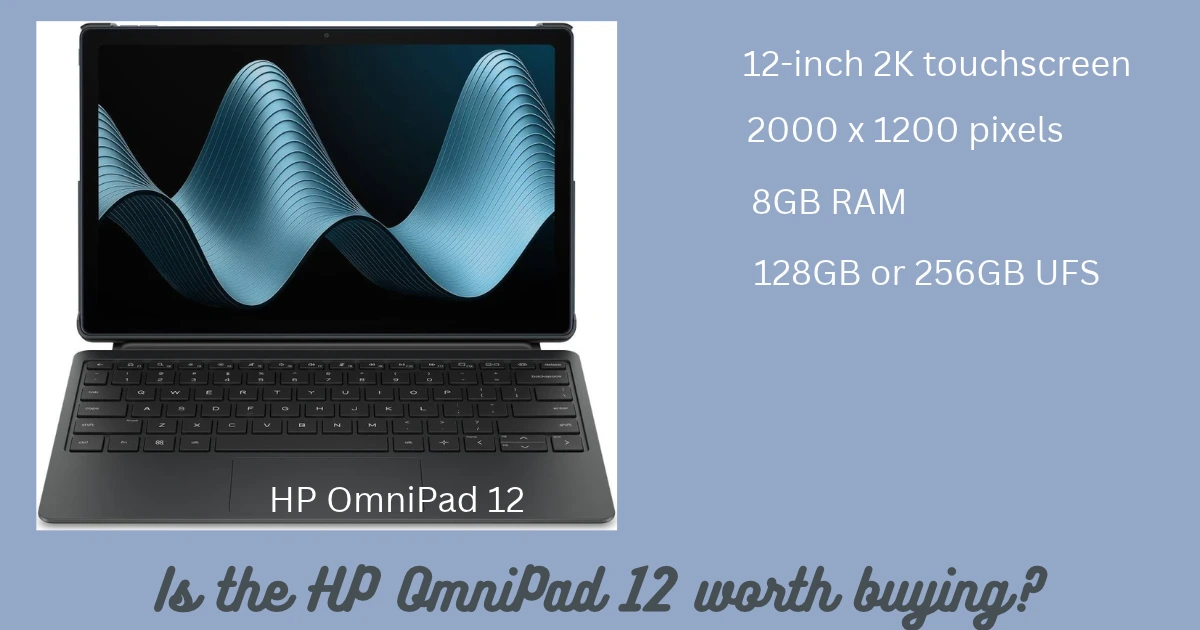
Buying a tablet for study or office work is not always as straightforward as it seems. A regular tablet is excellent for watching videos, reading documents and browsing the internet, but typing long assignments or working with multiple documents can be less comfortable without a keyboard. On the other hand, a traditional laptop may cost more, weigh more and feel unnecessary for people who mainly use a browser, video calls and everyday apps.
The HP OmniPad 12 attempts to bridge that gap. It combines a large touchscreen, Android software and a detachable keyboard to offer a device that can be used as a tablet or in a laptop-like setup. HP is positioning it towards students, first-time laptop buyers, families and people who need a portable device for everyday productivity.
The big question is whether this combination makes sense in real life. A large display and keyboard are useful, but they cannot automatically turn an Android tablet into a complete Windows laptop.
In this HP OmniPad 12 review, we examine its specifications, display, performance, keyboard experience, battery claims, limitations and value for money to help you decide whether it deserves a place on your shopping list.
HP OmniPad 12 price in India
HP lists the OmniPad 12 in different memory and storage configurations. At the time of checking, its official Indian store showed the following prices:
-
8GB RAM + 128GB storage: Rs 48,999
-
8GB RAM + 256GB storage: Rs 54,999
These are prices displayed on HP's online store and can change with discounts, bank offers, promotional codes and availability. Check the final checkout price before purchasing.
The detachable keyboard is part of the device's laptop-style proposition, so check the exact contents of the selected configuration rather than assuming that every retailer's bundle is identical.
For someone considering this tablet, the 128GB version is worth investigating if the device will mainly be used for classes, browsing, video streaming and document editing. The 256GB version offers more room for downloaded videos, large files, offline learning material and applications.
However, storage is only one part of the decision. Buyers should also consider whether their required apps work properly on Android and whether the tablet's multitasking experience matches their workflow.
HP OmniPad 12 specifications at a glance
The key specifications listed by HP include:
-
Display: 12-inch 2K touchscreen
-
Resolution: 2000 x 1200 pixels
-
Refresh rate: Up to 90Hz
-
Processor: Qualcomm Snapdragon SM6475Q platform
-
Memory: 8GB RAM
-
Storage: 128GB or 256GB UFS
-
Operating system: Android
-
Rear camera: 13MP
-
Front camera: 8MP
-
Audio: Quad speakers with DTS audio features
-
Connectivity: USB-C and wireless connectivity
-
Design: Detachable keyboard with laptop-like usage mode
-
Advertised battery life: Up to 18 hours under HP's stated testing conditions
The exact experience can vary by configuration, software updates, applications and usage. HP's advertised battery figure should be treated as a laboratory-based claim rather than a guarantee of how long every user will get.
Design and portability: A tablet that can travel easily
One of the OmniPad 12's main attractions is its flexible design. The tablet can be used without the keyboard when you want to read, browse or watch videos. Attach the keyboard when you need a more traditional typing position.
HP lists the tablet itself at approximately 600 grams, with a thickness of around 7.3mm. That makes the tablet portion relatively easy to carry in a bag. Remember, however, that the complete setup weighs more once the keyboard and any other accessories are included.
This distinction matters if you are buying the device specifically for travel. A tablet by itself is convenient for reading on a train, watching lectures or checking documents while away from your desk. A keyboard adds practicality for work, but it also adds bulk.
The detachable design is useful for students who alternate between typing notes and reading course material. It can also suit professionals who want to review documents during travel without carrying a full-sized laptop.
Nevertheless, the overall design should be judged as a complete package. Before buying, consider the keyboard's stability on your usual desk, the protection offered when the tablet is packed away and how comfortable the setup feels on your lap.
Display: A large screen for learning and entertainment
The HP OmniPad 12 features a 12-inch touchscreen with a resolution of 2000 x 1200 pixels. Its 16:10 aspect ratio provides useful vertical space for reading documents, viewing web pages and working with supported productivity applications.
The display supports a refresh rate of up to 90Hz. Compared with a conventional 60Hz screen, a higher refresh rate can make scrolling and supported animations appear smoother. The difference is most noticeable when moving through long documents, browsing websites and navigating compatible applications.
HP also lists 400 nits of brightness and 100% sRGB colour coverage. These specifications suggest a screen designed for general productivity, streaming and everyday visual tasks. They do not mean that the tablet is automatically suitable for every professional photo-editing workflow, where colour calibration and application support also matter.
The large screen is particularly useful for online classes. Students can read slides, keep learning material open and type notes without working on a small phone display. It is also comfortable for reading PDFs and reviewing spreadsheets that would feel cramped on a compact tablet.
There are limits, of course. A 12-inch screen does not provide the same working area as a large desktop monitor, and some Android applications may not use the available space efficiently. Before buying, check whether the apps you depend on support tablet layouts and split-screen use.
For entertainment, the screen size is an advantage. It is more practical than a phone for watching educational videos, movies and recorded lessons, especially when the device is placed on a stand.
Performance: Suitable for everyday tasks, not every workload
The OmniPad 12 uses Qualcomm's Snapdragon SM6475Q platform and includes 8GB of RAM. This hardware is intended for everyday mobile computing rather than demanding professional workloads.
Typical uses include web browsing, email, online meetings, document editing, learning platforms, social media, video playback and general productivity apps. These tasks do not normally require the same sustained processing power as professional video editing, advanced 3D work or demanding desktop development software.
The processor's limitations become more important when several applications are open simultaneously or when the device is expected to behave like a full laptop. Independent reviews have highlighted that its laptop-style experience is useful for routine work but can feel less effortless under heavier multitasking.
That is an important distinction for potential buyers. A tablet may have a keyboard, a taskbar and floating windows, but these features do not guarantee that every desktop workflow will run well.
If your daily work involves browser-based business software, email, documents and video calls, the OmniPad 12 may be sufficient. If you frequently handle large Excel workbooks, complex desktop accounting applications, specialised office software or professional creative tools, a Windows laptop may be the safer choice.
Before buying, make a list of your five most-used applications and confirm that their Android versions support all the features you need. This simple check can prevent disappointment later.
Desk Mode and the detachable keyboard
The OmniPad 12's defining feature is its laptop-like working experience. With the detachable keyboard connected, HP provides productivity-oriented features such as a persistent taskbar, windowed multitasking and keyboard shortcuts.
These features can make Android more practical for work. You can type longer documents, navigate supported applications with keyboard commands and arrange multiple windows for certain tasks.
For students, the keyboard can be helpful for assignments, notes and online examinations where the institution permits the device. For small-business owners, it can be useful for email, quotations, basic documents and browser-based services.
However, the keyboard experience deserves careful consideration. A tablet keyboard is not necessarily equivalent to a full-sized laptop keyboard. Key travel, layout, trackpad behaviour and stability can influence how comfortable it is during long working sessions.
Independent testing has also pointed out areas where the laptop-style experience needs improvement, including software behaviour and some keyboard-related usability details. Therefore, buyers who expect to type for many hours every day should try the keyboard if possible.
The most important question is not whether the tablet can imitate a laptop. It is whether the device supports your actual work without forcing you to find workarounds.
Battery life and charging
HP advertises up to 18 hours of battery life for the OmniPad 12 under its specified test conditions. Actual results depend on screen brightness, wireless connectivity, video playback, background applications and the type of work being performed.
A student attending a few online classes, reading documents and browsing between lessons may experience a different result from someone who keeps the display bright, joins video calls for hours and uses several applications at once.
Recent reviews have described battery life as a strength for mobile, everyday use. Even so, advertised maximum figures should not be treated as guaranteed real-world results.
Charging is another factor worth checking. If you intend to carry the tablet to college or work every day, confirm the included charging adapter, supported charging speed and charging time for the specific configuration. Do not assume that a long advertised battery life automatically means extremely fast charging.
For most users, the useful measure is whether the device can comfortably cover their normal working day and how convenient it is to recharge overnight or during a break.
Cameras, speakers and video calls
HP equips the OmniPad 12 with a 13MP rear camera and an 8MP front camera. The front camera is the more relevant one for online classes, video meetings and calls with family.
A tablet camera can be useful for scanning documents, photographing notes or joining meetings, but megapixel counts alone do not determine image quality. Lighting, software processing, focus and the camera's position all matter.
The rear camera should be adequate for occasional everyday photographs and document capture, although a tablet is unlikely to replace a good smartphone camera for most people.
Audio is a more important feature for a device intended for learning and entertainment. HP includes quad speakers with DTS audio features. Multiple speakers can create a fuller listening experience than a basic single-speaker arrangement, particularly for lectures and streaming video.
Speaker quality still depends on tuning, volume and the content being played. If you attend meetings in noisy environments, use the tablet in shared spaces or require clear microphone pickup, check independent tests and consider using a headset.
Software and application compatibility
The OmniPad 12 runs Android and adds features intended to make multitasking feel more like a desktop environment. This is useful, but software compatibility is the biggest factor to evaluate before treating it as a laptop replacement.
Android supports a wide selection of applications, including browsers, office suites, communication tools and learning platforms. However, some applications have reduced tablet functionality, and certain business tools are designed specifically for Windows or macOS.
A browser-based application may work well, while a locally installed desktop program may not have an equivalent Android version. Advanced spreadsheet macros, specialist enterprise software, certain printer utilities and desktop-only development tools are examples of workflows that need extra checking.
If you use Microsoft Office, Google Workspace or other productivity services, test the exact features you depend on. Basic document editing is not the same as running every advanced feature available in a desktop application.
Also review the manufacturer's software-update policy, security-update commitments and warranty terms before purchase. These details can affect how useful and secure the tablet remains over several years.
HP OmniPad 12: Pros and cons
What works in its favour
-
Large 12-inch 2K touchscreen for study, browsing and entertainment.
-
Up to 90Hz refresh rate for smoother scrolling.
-
Detachable keyboard and productivity-focused software features.
-
Lightweight tablet body for carrying between home, college and work.
-
Quad-speaker setup for videos and online learning.
-
128GB and 256GB storage options.
-
A useful alternative for people whose everyday tasks do not require full desktop software.
What needs consideration
-
Android cannot replace Windows for every professional application.
-
Heavy multitasking may expose the limits of the processor.
-
The keyboard and trackpad experience may not suit everyone.
-
Battery performance varies significantly with real-world use.
-
The 256GB model costs more, so storage needs should be assessed before buying.
-
Buyers should verify charging details, software support and the exact bundle before checkout.
Who should buy the HP OmniPad 12?
The HP OmniPad 12 makes the most sense for people who want a large Android screen and a keyboard in one portable package.
Students: It can suit online learning, reading PDFs, taking notes, writing assignments and attending classes, provided the required educational apps work properly.
Everyday home users: The large display and speakers make it useful for video streaming, browsing, video calls and shared family use.
Mobile professionals: It may work well for email, meetings, documents and browser-based tasks while travelling. It is less suitable if your job depends on demanding desktop applications.
First-time laptop buyers: The tablet offers a different route to basic productivity, but buyers should understand the difference between an Android tablet and a full Windows laptop before spending their money.
Who should consider a traditional laptop instead?
Choose a conventional laptop if you rely on desktop-only software, advanced Excel features, specialised business applications, professional video-editing tools or a workflow that requires several full-sized applications at once.
A laptop is also a more straightforward choice if you need extensive ports, broad peripheral compatibility or a familiar desktop operating system without relying on mobile-app alternatives.
The right decision depends on your workload, not just the device's appearance. A tablet with a keyboard can be excellent for light productivity, but it is not automatically the better option for every user.
Is the HP OmniPad 12 worth buying?
The HP OmniPad 12 is an interesting option for buyers who want a tablet that can handle more than entertainment. Its 12-inch 2K display, detachable keyboard, Android software and portability give it a practical role in education and everyday productivity.
Its strongest appeal is convenience. You can use it as a tablet for reading and video, then attach the keyboard for writing documents and completing routine tasks. That flexibility can be valuable for students, families and professionals who work primarily through mobile apps and web services.
Its main limitation is the gap between a laptop-like interface and full laptop capability. The Snapdragon platform is intended for everyday work, and demanding applications or intensive multitasking may expose its limitations. Software compatibility and keyboard comfort deserve attention before purchase.
At the displayed starting price of Rs 48,999, the OmniPad 12 should be compared with other tablets and entry-level laptops available at the time you buy. Check the final price, storage configuration, included accessories and software requirements rather than relying on the advertised discount alone.
Our recommendation: Consider the HP OmniPad 12 if you value portability, a large screen and light productivity in one device. If you need a dependable machine for complex office work or specialised desktop applications, compare it carefully with a traditional laptop before making your decision.