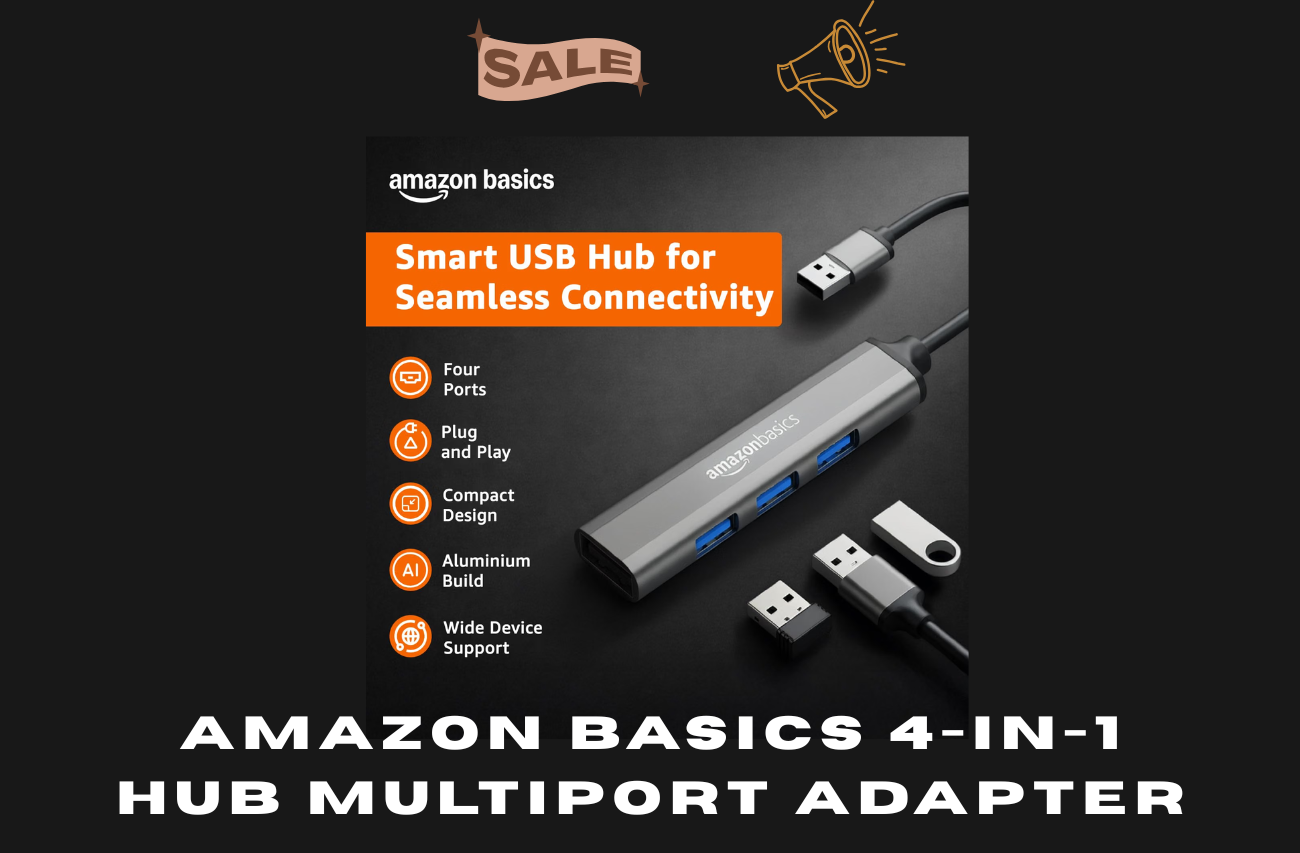
Modern laptops are becoming thinner and more compact, but that often comes with fewer physical ports. If you regularly connect a mouse, keyboard, pen drive, external storage device or other USB accessories, a USB hub can make everyday computing much easier.
The Amazon Basics 4-in-1 Hub Multiport Adapter is designed for users who need additional USB-A connections without carrying a large docking station. It provides four USB-A ports in total: one USB 3.0 port and three USB 2.0 ports.
In this review, we look at the hub's specifications, connectivity, transfer speeds, build, compatibility, advantages, limitations and the type of user who may benefit most from it.
Amazon Basics 4-in-1 USB Hub: At a Glance
| Feature |
Details |
| Brand |
Amazon Basics |
| Product type |
4-in-1 USB Hub |
| Hardware interface |
USB |
| USB 3.0 ports |
1 |
| USB 2.0 ports |
3 |
| Total USB-A ports |
4 |
| USB 3.0 transfer rate |
Up to 5 Gbps |
| USB 2.0 transfer rate |
Up to 480 Mbps |
| Design |
Aluminium shell |
| Feature |
Plug and play |
| Compatible devices |
Desktops, smartphones and tablets |
| Use cases |
Mouse, keyboard, USB drives and other compatible USB devices |
What Is the Amazon Basics 4-in-1 USB Hub?
The Amazon Basics 4-in-1 USB Hub is a compact connectivity accessory designed to expand a single USB-A connection into four USB-A ports.
This can be useful when your computer does not have enough available USB ports. Instead of repeatedly unplugging one accessory to connect another, you can keep several compatible USB devices connected to the hub.
The layout consists of:
- 1 × USB 3.0 port
- 3 × USB 2.0 ports
This makes the hub particularly practical for mixed workloads. The USB 3.0 connection is intended for faster data-transfer tasks, while the USB 2.0 ports can be used for peripherals where very high transfer speeds are not essential.
USB 3.0 and USB 2.0: What Is the Difference?
One of the most important things to understand before buying this hub is that its four ports are not identical.
The USB 3.0 port is specified for transfer speeds of up to 5 Gbps, while the USB 2.0 ports are specified for speeds of up to 480 Mbps.
In practical terms, this means the USB 3.0 port is the better choice when you are moving larger files or using a compatible high-speed storage device.
For example, you could reserve the USB 3.0 connection for a compatible external storage device and use the USB 2.0 connections for a keyboard, mouse or other accessories.
However, advertised maximum transfer rates are theoretical interface limits. Actual speeds can vary depending on the computer, connected device, files being transferred, operating system and other hardware.
Four USB Ports in a Compact Design
The biggest advantage of this hub is straightforward: it gives you four USB-A connections from one connection point.
For someone working with several USB accessories, this can reduce the need to constantly swap cables.
A typical setup might include:
- Wireless mouse receiver
- Keyboard
- USB flash drive
- External storage or another USB accessory
The exact combination will depend on your computer and the power requirements of the connected devices.
The compact aluminium-shell construction is also designed to make the adapter easy to carry. If you frequently work from different locations, a small USB hub can be more convenient than carrying a larger docking station.
Plug-and-Play Convenience
The product is designed around a plug-and-play approach. According to the supplied product information, it does not require additional driver or software installation for normal use.
That is useful for people who want a simple accessory rather than a complicated docking solution.
The basic idea is simple: connect the hub to a compatible USB port and then connect your USB accessories to the available ports.
Of course, compatibility can still depend on the host device, operating system and the specific USB connection available on that device.
Aluminium Shell and Portable Design
The aluminium shell is another notable feature.
A metal enclosure can provide a more solid feel than some inexpensive plastic USB hubs, while the compact design makes the device easier to store in a laptop bag or pocket.
For students, office workers and people who frequently work away from their desks, portability can be just as important as the number of ports.
The compact design also means that this is more of a USB expansion accessory than a full desktop docking station.
Compatibility: Who Can Use It?
The supplied specifications list compatibility with desktops, smartphones and tablets, while the product description also mentions laptops and devices such as MacBook, Mac mini and iMac.
Before purchasing, however, check the ports on your particular device.
This is especially important with newer laptops and tablets that rely primarily on USB-C. A USB-A hub cannot automatically provide compatibility with every USB-C device without the appropriate connection or adapter.
In other words, check your device's physical port and compatibility before ordering.
Is It Useful for a MacBook?
The hub can be useful for Mac users who have compatible USB connectivity and need additional USB-A ports.
For example, someone working with older USB-A accessories may want to connect a keyboard, mouse or storage device without purchasing a large multi-function docking station.
However, MacBook models differ in their available ports. If your MacBook has only USB-C/Thunderbolt ports, you should carefully check how the hub connects to your specific model before buying.
Is It Useful for Windows PCs and Laptops?
For a compatible Windows desktop or laptop, the hub can be useful when additional USB-A ports are needed.
It can be particularly convenient for users who have several everyday peripherals but don't need features such as HDMI output, Ethernet, SD card readers or display connectivity.
That distinction is important.
A four-port USB hub is designed primarily to expand USB connectivity. It should not be confused with a full-featured USB-C docking station.
What Can You Connect?
The hub can potentially be useful for many everyday USB accessories, depending on compatibility and power requirements.
Examples include:
- USB keyboard
- USB mouse
- USB flash drive
- Compatible external storage
- USB card reader
- Other compatible USB peripherals
For faster data-transfer devices, the USB 3.0 port is the more appropriate choice.
For simple peripherals such as keyboards and mice, USB 2.0 is generally sufficient because these devices do not normally require high-bandwidth data transfer.
Customer Rating and Reviews
Based on the customer-review information supplied for this article, the product has a rating of 4.2 out of 5 stars from 1,362 global ratings.
The supplied rating distribution is:
| Rating |
Share |
| 5 stars |
60% |
| 4 stars |
21% |
| 3 stars |
10% |
| 2 stars |
2% |
| 1 star |
7% |
These figures provide useful context, but an overall rating should not be treated as proof that the product will perform identically for every buyer.
USB hubs can behave differently depending on the host computer, connected accessories, storage devices and power requirements.
Therefore, buyers should consider both the specifications and their own intended use.
Pros of the Amazon Basics 4-in-1 USB Hub
1. Four USB-A connections
The main benefit is the ability to connect multiple USB-A accessories through one hub.
2. One USB 3.0 port
The dedicated USB 3.0 port provides a faster connection than the USB 2.0 ports and is the better choice for compatible high-speed data-transfer devices.
3. Three USB 2.0 ports
These additional ports can be useful for everyday peripherals such as keyboards, mice and other compatible accessories.
4. Plug-and-play design
The supplied information indicates that no additional driver or software installation is required for normal use.
5. Compact construction
Its compact form makes it convenient for people who carry a laptop or work across multiple locations.
6. Aluminium shell
The aluminium exterior provides a compact metal enclosure and is intended to assist with heat dissipation.
Cons and Things to Consider
Only one USB 3.0 port
If you regularly use several high-speed USB devices simultaneously, having only one USB 3.0 port may be limiting.
USB-A focused design
The hub is primarily useful for USB-A connectivity. Users with USB-C-only devices should check compatibility before purchasing.
Not a full docking station
This product is designed for USB expansion. It does not replace a feature-rich docking station with HDMI, Ethernet, multiple display outputs or other specialised connections.
Actual speeds can vary
The stated 5 Gbps and 480 Mbps figures represent interface-level maximums. Real-world transfer performance depends on the connected hardware and other conditions.
Who Should Consider This USB Hub?
The Amazon Basics 4-in-1 USB Hub may be worth considering if you:
- Need additional USB-A ports
- Frequently use several USB peripherals
- Want a compact accessory for a laptop bag
- Need one faster USB connection alongside three standard USB connections
- Prefer a simple plug-and-play setup
- Do not need HDMI, Ethernet or other docking-station features
Who May Want Something Else?
A different type of adapter may be more suitable if you:
- Mainly use USB-C devices
- Need multiple USB 3.0/3.2 ports
- Need HDMI or DisplayPort
- Need Ethernet connectivity
- Need SD or microSD card slots
- Want a full laptop docking station
- Regularly connect several power-hungry devices
In these situations, a multiport USB-C hub or docking station may provide a more suitable feature set.
Amazon Basics 4-in-1 USB Hub vs a Full Docking Station
It is useful to understand the difference before making a purchase.
A compact four-port USB hub focuses on adding USB connections.
A docking station usually offers a much broader selection of ports, such as:
- HDMI
- DisplayPort
- Ethernet
- USB-A
- USB-C
- SD card slots
- Audio connections
If your only problem is not having enough USB-A ports, paying extra for a large docking station may not be necessary.
If you want to connect monitors, wired networking and multiple types of peripherals, a docking station may make more sense.
Buying Checklist Before You Order
Before purchasing the Amazon Basics 4-in-1 USB Hub, check these five things:
1. Check your computer's port
Make sure your computer has a compatible USB connection for the hub.
2. Identify your accessories
Count how many USB-A devices you normally use.
3. Decide where speed matters
Use the USB 3.0 connection for compatible high-speed storage and similar devices when possible.
4. Check power requirements
Some USB accessories require more power than simple peripherals. Check the requirements of devices you plan to connect.
5. Decide whether you need more than USB
If you require HDMI, Ethernet, SD card support or multiple high-speed ports, consider a more advanced hub or docking station instead.
Frequently Asked Questions
Is the Amazon Basics 4-in-1 USB Hub fast?
The product information specifies up to 5 Gbps through its USB 3.0 port and up to 480 Mbps through its USB 2.0 ports. Actual transfer speeds can vary depending on the connected hardware and other conditions.
How many USB ports does it have?
It has four USB-A ports in total: one USB 3.0 port and three USB 2.0 ports.
Does it require drivers?
The supplied product information describes the hub as plug-and-play and states that additional drivers or software are not required for normal use.
Can I use it with a MacBook?
It is listed as compatible with MacBook and other devices, but you should check the ports available on your specific MacBook model before purchasing.
Can I connect a keyboard and mouse?
Yes, compatible USB keyboards and mice are typical examples of peripherals that can be connected to a USB hub. Actual compatibility can depend on the host device and connected equipment.
Is this a USB-C hub?
No. The product described here is a USB-A-focused four-port hub. If your computer has only USB-C ports, check the connection requirements carefully before ordering.
Does it replace a docking station?
Not for users who need display outputs, Ethernet, SD card readers or several different connection types. This product is better understood as a compact USB expansion hub.
Bank Offer-
Flat INR 50 Instant Discount on SBI Credit Card Non-EMI Txn. Minimum purchase value INR 1000
Flat INR 50 Instant Discount on HDFC Bank Credit Card Non-EMI Txn. Minimum purchase value INR 1000
Flat INR 50 Instant Discount on Axis Bank Credit Card Non-EMI Txn. Minimum purchase value INR 1000
2.5% Instant Discount up to INR 3000 on Axis Bank Credit Card EMI Trxn. Minimum purchase value INR 7500.00
Final Reviews.
The Amazon Basics 4-in-1 USB Hub is aimed at users who want a straightforward way to add more USB-A connections without carrying a bulky docking station.
Its combination of one USB 3.0 port and three USB 2.0 ports gives users a practical mix of faster data connectivity and everyday peripheral support. The compact aluminium-shell construction and plug-and-play design further suit people who want a simple portable accessory.
Its main limitation is also clear: this is primarily a USB expansion hub, not a complete laptop docking station. Users who need HDMI, Ethernet, SD card support or several high-speed USB connections should look at a more advanced solution.
For buyers who mainly need extra USB-A ports for everyday accessories, however, this four-port design offers a relatively simple and practical approach.
Where to Check the Latest Price
Prices, availability and offers can change frequently. Before purchasing, check the current listing and specifications to make sure the product matches your device and requirements.
BestSaller.in Tip: Don't choose a USB hub based only on the number of ports. Check the type of ports, transfer-speed requirements, device compatibility and power requirements first.